How to Pay With USDC at Any QR Code: Step-by-Step Guide
Use your digital dollars in the real world. Pay compatible local QR codes like UPI, PIX and QRIS straight from your USDC balance with Scan & Pay on P2P.me.

On this page
Have you ever tried to pay for dinner with your crypto savings? If so, you know the long road: send funds to an exchange, pay network fees, wait for the conversion, withdraw to your bank, and only then pay by card or transfer.
Every step costs time and fees and puts your data on yet another platform. With P2P.me that road gets much shorter: you can pay with USDC at shops that accept local payment QR codes, in the countries where P2P.me operates.
How does paying with USDC by QR work?#
P2P.me connects your USDC to everyday commerce with a peer-to-peer protocol. You pay in USDC and the shop receives local currency through the payment system it already uses. When you pay a compatible QR code:
- The app reads the amount in your local currency.
- You see the exact USDC amount and the fee before you confirm.
- A verified seller pays the shop in local currency. Your USDC stays locked in a smart contract and is released to the seller only when the payment is complete.
You never hand your private keys to anyone, and P2P.me never holds your funds.
Why pay with USDC and not another crypto?#
Bitcoin and Ether can change price a lot in minutes, so you never know what that coffee really cost. USDC is designed to be worth 1 dollar, so the amount you see when you confirm is the amount you pay, and the shop gets exactly what it charged. Behind USDC is Circle, a US company listed on the New York Stock Exchange that publishes a monthly independent review of its reserves.
Your first purchase with USDC in 5 steps#
Here's how to do it in the P2P.me web app (app.p2p.me):
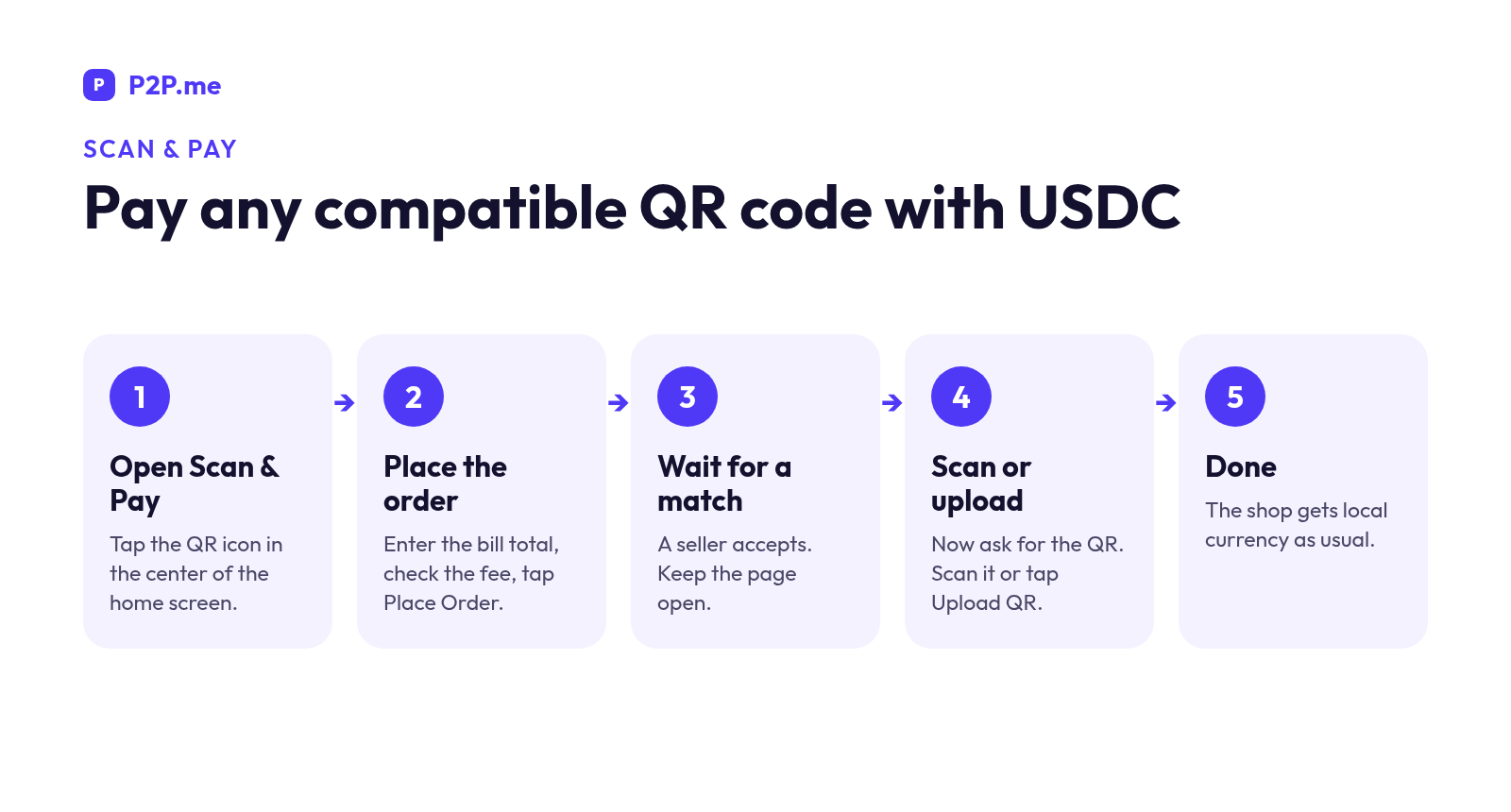
- Open Scan & Pay. On the home screen you'll see Buy USDC, Scan & Pay and Sell USDC. Tap Scan & Pay, the QR icon in the center.
- Enter the amount and tap Place Order. Ask the shop for the total only, not the QR code yet. The arrows button switches between local currency and USDC. Check the amount and fee, then tap Place Order.
- Wait for a seller to accept. A progress bar shows each stage: Merchant accepting, Scan/Upload QR and Processing payment. Keep the page open.
- Now ask for the QR, then scan or upload it. Many shop QR codes expire after a couple of minutes, so asking for it only now gives you the most time. Paying online or have a screenshot? Tap Upload QR and choose it from your gallery. If the camera doesn't open, tap Retry and check your browser's camera permission.
- Done. When Processing payment finishes, the shop receives its money in local currency. If you have questions, tap the Help button at the top.
Always check that the amount you entered matches the bill before you scan, because the order is placed for the amount you typed.
Where you can pay with USDC#
- Cafés and restaurants: pay for coffee or dinner from your USDC balance.
- Supermarkets and corner shops: pay at the checkout like any other customer.
- Local services: the barber, fuel, or an independent professional. If they accept a compatible local QR code, you can pay with USDC.
There's a bonus: your savings stay in digital dollars until the last moment. Instead of exchanging a big amount at the start of the month, you convert only what each purchase costs, right when you make it.
Travel and pay like a local#
P2P.me works the same way in every country it supports and connects to the QR codes shops already use, such as UPI in India, PIX in Brazil and QRIS in Indonesia. When you travel, you don't need to change cash at the airport or pay foreign card fees: open the app, scan and pay from your USDC balance. Check in the app which methods are available at your destination.
The long road vs. Scan & Pay#
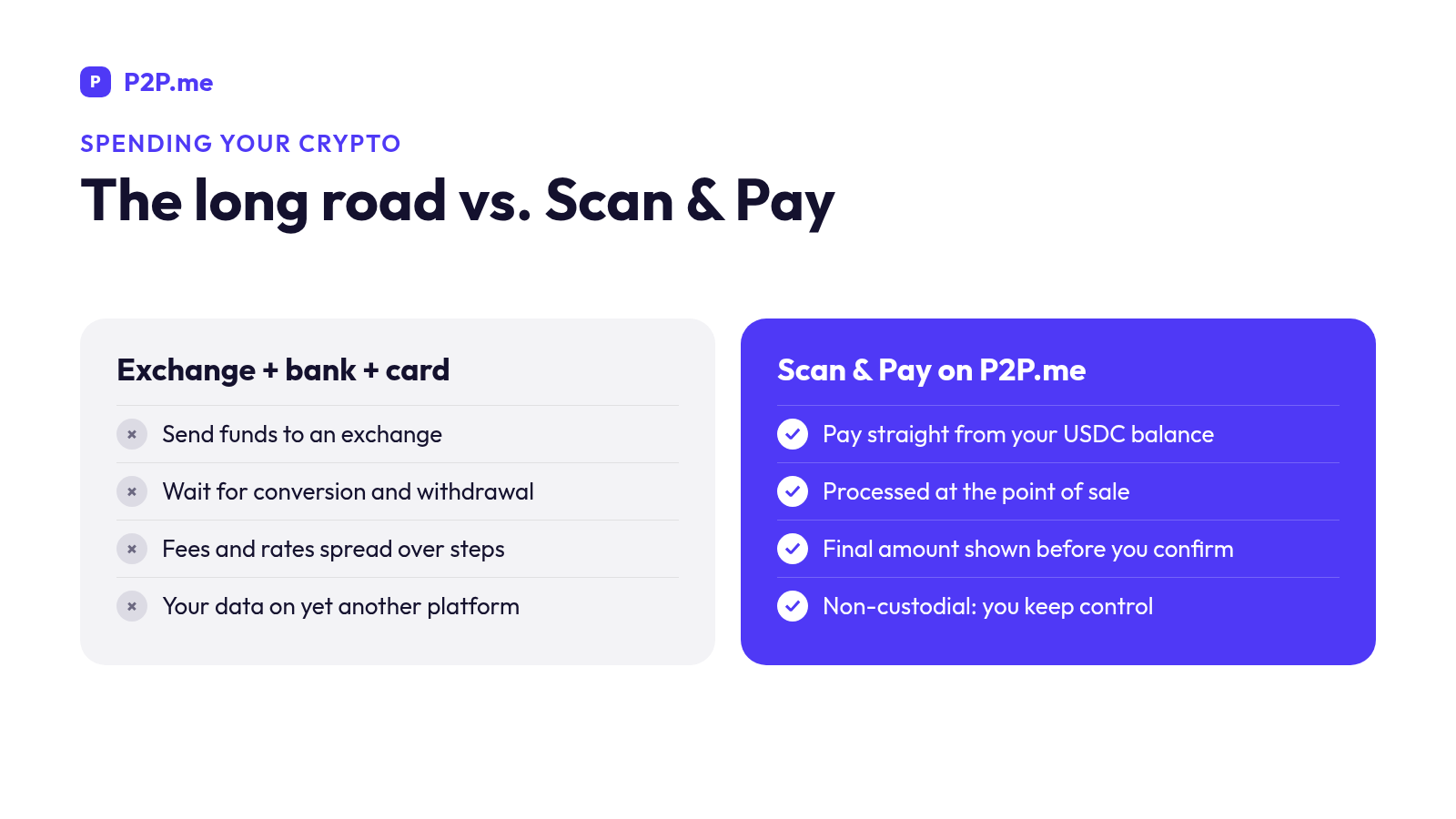
- Privacy: exchanges and crypto cards ask you to upload documents to their servers. P2P.me uses zk-KYC, so your documents aren't shared with third parties.
- Custody: on an exchange, the platform holds your funds. On P2P.me you control your funds.
- Time: the exchange route takes minutes or hours before you can pay. Scan & Pay is processed at the point of sale.
- Transparency: fees and rates spread across several steps vs. one final amount shown before you confirm.
Frequently asked questions#
Can I pay with USDC at any shop?#
You can pay any shop that shows a compatible local payment QR code in a country where P2P.me operates. Check the methods for your country in the app.
Does the shop need to accept crypto?#
No. The shop receives local currency through its usual payment system. The seller on the network handles the conversion.
How much does it cost?#
The app shows the fee and total before you confirm. Check it on every order.
What if the payment isn't completed?#
Your USDC stays protected in the smart contract while the order is open, and you can open a dispute from the order. If it's resolved in your favor, the funds come back automatically.
Start using your digital dollars#
Keep your balance in USDC and use it for everyday purchases. Try your first Scan & Pay on P2P.me.
This content is for informational purposes only and does not constitute financial advice. Digital assets involve risks. Check the terms and availability in your country before trading.
More in Community
View all
India Bank Freeze Protection: 100% USDC Refund via unfreeze.pro
For Indian users, P2P.me refunds 100% of a P2P.me transaction in USDC if it leads to a bank freeze or lien. Here's who's covered, the conditions and how to file at unfreeze.pro.
Sheldon Cooper5 min read
How Disputes Work on P2P.me: Timers, Proof and Refunds
Paid but the order was cancelled? Money didn't arrive? Here's how P2P.me order timers, disputes, proof, appeals and automatic refunds work, step by step.
Sheldon Cooper6 min read
P2P.me Limits Explained: Why They Start Low and How to Raise Them
Why new P2P.me accounts start with low limits, what the per-order and yearly caps are, and the simple ways to raise your limits with verification, staking and trading.
Sheldon Cooper5 min read